Please watch the video below for a tutorial on how to use the ScopeSnap. Note that the ScopeSnap works best without a case on your device and the grommet must be removed from the ocular lens to fit. They are optimized to the optical system of the microscope so while they are universal to all devices, they are not universal to all microscopes; this is what allows them to work without any user adjustment. If you like the ScopeSnap or want to support the mission of making bioimaging more accessible, please consider donating below to help with the costs of web hosting.
Currently Supported Microscopes
- Leica DM300
- Leica DM500
- Leica GZ-6
- Leica CM-E
- Leica ZOOM 2000
- Zeiss Primostar
- Bausch & Lomb StereoZoom
- Nikon Alphaphot 2
- Nikon SMZ-1
- Nikon Eclipse E100
- Zeiss Axiostar
- Olympus SZ40
- Olympus SZ60
- Olympus CHT
- Olympus CX40
- Westover MC-2205
Please consider donating to help with the costs of web hosting
Make a one-time donation
Make a monthly donation
Make a yearly donation
Choose an amount
Or enter a custom amount
Your contribution is appreciated.
Your contribution is appreciated.
Your contribution is appreciated.
DonateDonate monthlyDonate yearlyJig Tutorial
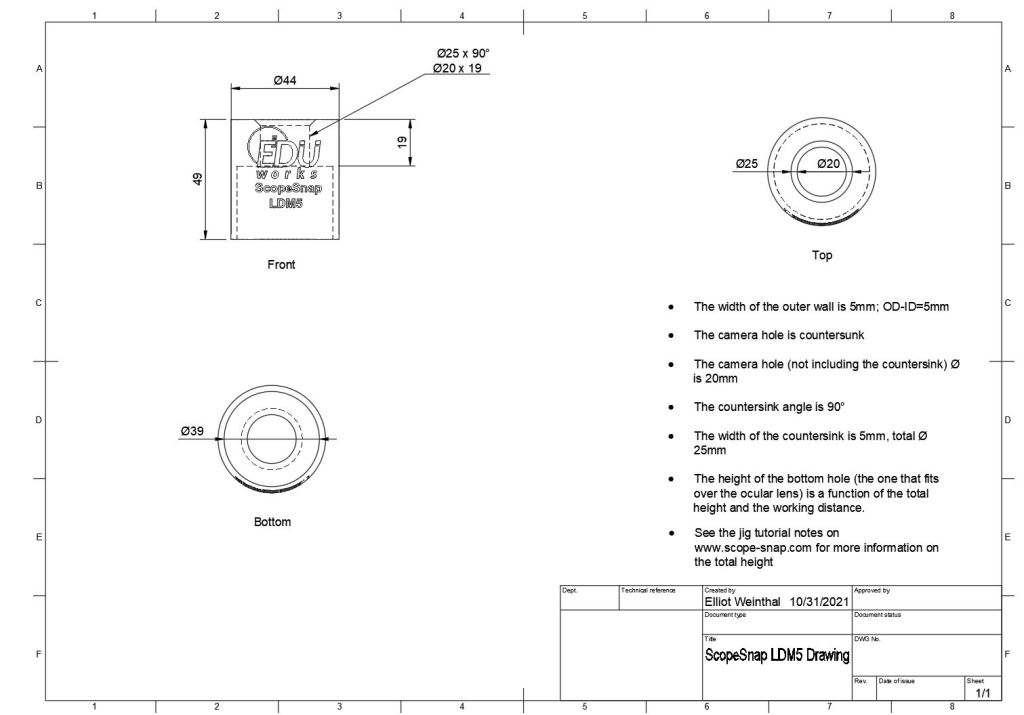
ScopeSnap by Elliot Weinthal is licensed under a Creative Commons Attribution-NonCommercial-ShareAlike 4.0 International License. You may reproduce and/or modify for non commercial use only – I simply ask that if you create a ScopeSnap to support a new microscope model that you send me the model name and dimensions so that I can create an STL file and load it here for others to use. To use the jigs, you must print both the diameter sleeves and working distance spacers. The diameter sleeves are used to find the diameter of the ocular lens; while you can use a caliper to determine this, I have found that printing them proves more accurate due to printer tolerances. I also noticed that when printing the sleeves, the side that comes from the print bed has a small lip which will interfere with testing and provide an inaccurate diameter measurement – make sure you slide the side of the sleeve that doesn’t have the lip on first to determine proper diameter size. Once you find the correct diameter, just write down the size of that sleeve – I recommend writing the sleeve size on the sleeves after you print, it will be difficult to tell them apart without a caliper. The spacers are used to determine the working distance of the microscope, simply hold them on the ocular lens (with the grommet removed) and use your device with the spacer to determine which size provides the best image quality and write down the spacer size. The next dimension you will need is the total height of the ScopeSnap; if the ScopeSnap is too tall, it will interfere with the diopter adjustment or head. With that said, the height must be tall enough so that the ScopeSnap stays on the ocular lens without falling off, you can use the sleeves to have the device fit over the diopter adjustment if the lens itself is too short. Once you have these parameters, you can replace the OD, ID, working distance, and total height of the drawing below to create your own!
 ScopeSnap